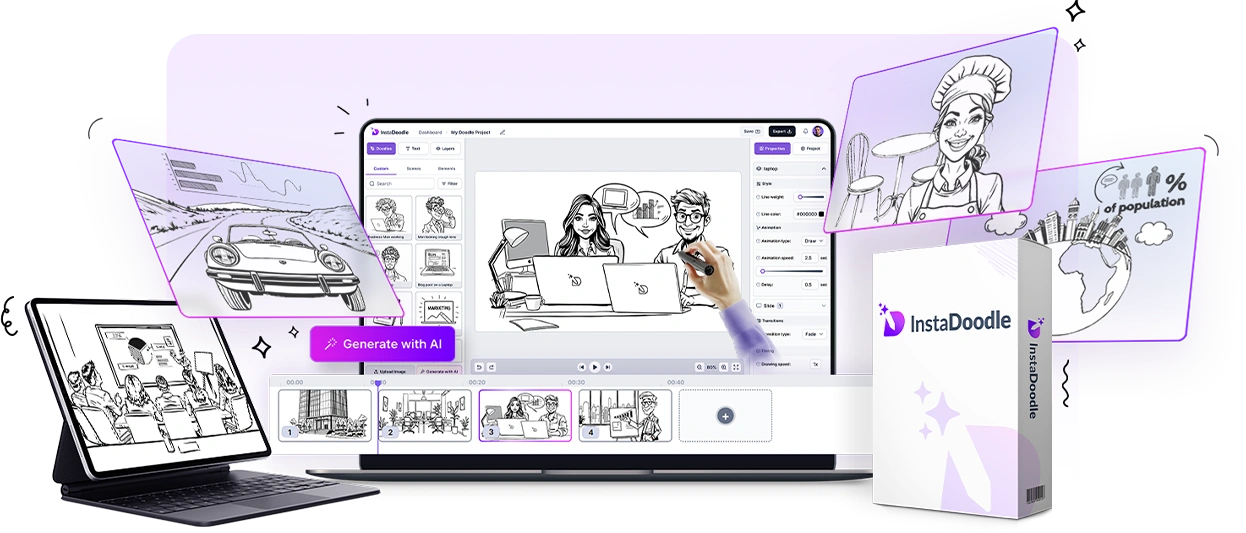
InstaDoodle is a browser-based tool for whiteboard animation: the style where a hand sketches drawings on screen while a voice explains an idea. Its ClickBank offer page sells it for $37, one-time. We went through everything a buyer sees before and after that checkout, plus about 200 customer reviews, to work out what the version most people end up wanting actually costs.
The receipt
InstaDoodle, scored
| Time | A basic video within an hour, according to testers |
| Cost | $37 to start, about $201 for everything |
| Output | Clean, simple explainers; AI doodles are hit and miss |
| Real earning path | Selling short explainers (needs the $97 Pro license) |
| Overall | 6.5/10 |
Worth paying for if… you want simple whiteboard-style explainers for your own business, lessons or social posts, and you’re happy to treat $37 as an experiment.
Skip it if… you need polished, agency-quality animation, you hate upsells, or you plan to sell videos but don’t want to pay for the Pro license.
How we researched and scored this review
We haven’t used InstaDoodle on a paid project, and we won’t pretend otherwise. This review is built from things you can check yourself: the official sales page, the $37 ClickBank offer page, both upgrade pages, the vendor’s terms and affiliate page, InstaDoodle’s live sales data in the ClickBank marketplace, about 200 customer reviews on Trustpilot, and write-ups from independent testers who did use it. Prices were checked on 28 September 2026.
| What we scored | Score | Why |
|---|---|---|
| Ease of use | 8/10 | The one thing happy and unhappy customers agree on |
| Output quality | 6/10 | Fine for simple explainers; AI images often need retries |
| Value for money | 6/10 | Strong at $37, weaker once you add the upgrades |
| Trust and support | 6/10 | Support replies quickly, but upsell and refund complaints are common |
The overall score is the average of the four. If you’ve used InstaDoodle and something here doesn’t match your experience, tell us and we’ll update the review.
What we found that most reviews leave out
- The $37 page is built for ad traffic. The ClickBank offer page’s own browser tab reads “FB Offer v31”, which points to a Facebook-ad landing page that has been through many versions. That explains the hard-sell tone. It isn’t a problem in itself, but it’s worth knowing who the page was written for.
- The “price is going up” warning is scripted. The vendor’s affiliate page gives promoters a ready-made email saying the one-time price will soon switch to a monthly subscription. Monthly plans already exist on InstaDoodle’s homepage, and the $37 one-time offer was still live when we checked. Don’t let that warning rush you.
- It converts unusually well, and that shapes what you read about it. In ClickBank’s marketplace, about 2.3 of every 100 visitors that affiliates send to InstaDoodle end up buying. Most products in its category convert well under 1 in 100. High-converting products attract lots of affiliates, which is why search results are crowded with glowing reviews and sites calling themselves the official store. We’re an affiliate too (see the note at the top of this page), which is exactly why we’re showing you the upsells.
- The refund window depends on which page you read. The sales page says 60 days; the terms page says 14. More on that below.
What you get
You pick a template or start blank, drop in doodle characters and props, add text and audio, and export an MP4. The part that sets it apart from older whiteboard tools is DoodleAI, which draws new characters from a text prompt and turns your photos into sketches.
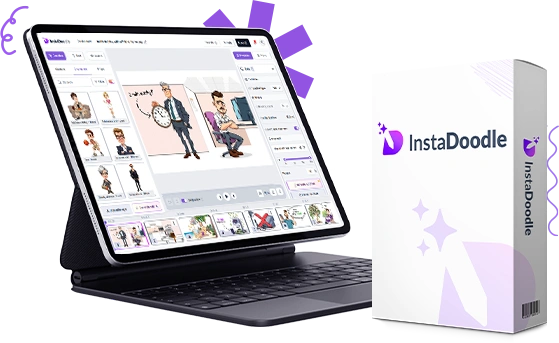
- DoodleAI generator: type a prompt and get a doodle character or prop. The $37 version includes 150 AI credits; more cost extra.
- Image-to-sketch converter: turns photos and logos into hand-drawn style images, with a built-in background remover.
- Ready-made library: 1,000+ doodle elements and 14 templates on the base plan, with 3,000+ more elements in Pro.
- Drag-and-drop editor: 6 animation types (draw, wipe, slide, fade and more), slide transitions and a choice of drawing hands.
- Audio: upload your own voiceover and music, or pay extra for AI narration.
- Any video shape: 16:9 for YouTube, 9:16 for Reels and Shorts, 4:5 and square.
- Nothing to install: it runs in the browser on Mac, Windows or anything else.
- Export: 1080p on the base plan; 2K and 4K need Pro.
See it in action
This is InstaDoodle’s own demo, so treat it as the best-case version of the tool.
InstaDoodle pricing, including the upgrades
InstaDoodle is sold two different ways, which is why prices in other reviews rarely match.
Option 1: the one-time ClickBank offer
| Package | Price | What you get |
|---|---|---|
| InstaDoodle | $37 one-time | Unlimited videos, 1,000+ elements, 14 templates, 150 AI credits, 1080p export. For your own use only. |
| Color version | $67 one-time, instead of $37 | Adds color doodle elements |
| AI Voice add-on | $27 | AI voiceovers |
| Pro upgrade | $97 one-time or $47 a month | Commercial license, 3,000+ pro elements, 2K and 4K export, custom fonts, 4 AI variations per element |
| AI Wizard | $67 one-time or $47 a month | AI script writer, 6 AI voices, one-click video creation |
Option 2: monthly plans on the main site
InstaDoodle’s homepage sells subscriptions instead: Standard at $47 a month, Pro at $67 a month (includes the commercial license) and Agency at $127 a month (adds the AI Wizard, AI voices and unlimited AI credits).
Add it up: the $37 base, the $97 Pro upgrade and the $67 AI Wizard come to $201, all one-time. That’s less than a year of most subscription whiteboard tools, but it isn’t $37.
The license catch: no selling videos on the $37 plan
This is the detail most reviews skip. InstaDoodle’s own Pro upgrade page states that the standard package covers videos for yourself and your own business, and that selling your videos requires Pro. If you want to make videos for clients, budget for Pro from day one: $97 one-time or $47 a month on the ClickBank offer, or the $67 monthly Pro plan.
What customers say
InstaDoodle’s sales page advertises a 4.9 out of 5 rating from 4,268 customers. Independent ratings are lower. On Trustpilot it holds 3.8 out of 5 from about 200 reviews, with 54% five-star and 19% one-star.
The praise is consistent: it’s easy to learn with no design skills, support replies quickly, and it works well for teachers, trainers, podcasters and small-business promos.
The complaints cluster around four things:
- Upsells: several buyers felt the one-time price led to paywalls for features they expected.
- Refunds: some report slow or ignored refund requests.
- Speed: projects get slow and unstable beyond a handful of slides, with some failed exports.
- AI images: odd proportions and broken anatomy, so you burn credits on retries.
One independent tester, App Review Lab, found basic animations easy to make within an hour, but found the AI images inconsistent and timing several objects on screen fiddly. Their conclusion: fine as a cheap experiment, not for professional work.
Pros and cons
What’s good
- $37 entry price with no monthly fee
- Easy drag-and-drop editor for beginners
- AI doodle generator and photo-to-sketch converter
- Widescreen, vertical and square formats
- ClickBank’s 60-day return policy as a backstop
What’s not
- Heavy upsells: the full kit is about $201
- No commercial license on the $37 plan
- AI images need retries, which use up credits
- Mixed reviews, including refund complaints
- Only does the doodle and whiteboard style
Refunds and buying safely
- Ask early if you want your money back. The sales page promises a 60-day money-back guarantee, but InstaDoodle’s terms page mentions a 14-day guarantee.
- Go to ClickBank if the vendor goes quiet. The $37 offer is sold through ClickBank, whose return policy allows returns within 60 days of purchase. You can request one from ClickBank’s customer support at clkbank.com.
- Watch out for look-alike sites. Several sites in search results call themselves the official InstaDoodle store, for example instadoodle.org and instasdoodle.net. The vendor’s own site and affiliate program use instadoodle.com, so start there and check that checkout runs through ClickBank.
InstaDoodle vs alternatives
| Tool | Price | Good to know |
|---|---|---|
| InstaDoodle | $37 one-time to start; plans from $47 a month | AI doodle generator; selling videos needs Pro |
| VideoScribe | From $150 a year (about $12.50 a month) | 7-day free trial; reseller rights on the $280-a-year Max plan |
| Doodly | $49 a month or $490 a year | Large character library; 30-day money-back guarantee |
For a handful of videos, InstaDoodle’s one-time price is the cheapest way in. If you’d rather try before paying anything, VideoScribe has a free trial.
Our verdict
Buy InstaDoodle if you want simple whiteboard videos for your own business, lessons or social posts, and you’re comfortable with a tool that sells hard. At $37, with ClickBank’s return policy behind it, it’s a low-risk experiment. If you plan to sell videos, budget for Pro from the start. If you need polished animation, or want to try before you pay, start with VideoScribe’s free trial instead.
Bonus: a practical way to earn with it
The most practical earning path is selling short explainer videos to small businesses, coaches and course creators. Established Fiverr sellers charge from around $50 for a 30-second whiteboard video with script and voiceover, so the demand is there, and so is the competition. Our separate guide covers the license you need, what to charge, where to find clients and the mistakes to avoid.
InstaDoodle FAQ
Is InstaDoodle a one-time payment?
Both. The ClickBank offer is $37 one-time, with optional one-time or monthly upgrades. The main website sells monthly plans from $47 a month.
Can I sell the videos I make with InstaDoodle?
Only with the Pro upgrade or the Pro plan, which include the commercial license. The $37 package covers videos for yourself and your own business.
Is there a free trial?
No. InstaDoodle offers a money-back guarantee instead of a free trial.
Does it work on Mac and Windows?
Yes. It runs in the browser, so there’s nothing to install.
What happens when I run out of AI credits?
The base plan comes with 150 AI credits, and extra credits cost more. The $127-a-month Agency plan includes unlimited credits.
Is InstaDoodle legit?
Yes. It’s a real product sold through ClickBank by an established vendor. Reviews are mixed mainly because of upsells and refund experiences, not because the software doesn’t work.
Update log: 28 September 2026: first published, with prices, plans and review counts checked that day.
Sources
- InstaDoodle’s sales page, ClickBank offer page, Pro and AI Wizard upgrade pages, affiliate page and terms, checked 28 September 2026
- ClickBank affiliate marketplace statistics for InstaDoodle, checked 28 September 2026
- InstaDoodle reviews on Trustpilot
- App Review Lab’s hands-on InstaDoodle review
- ClickBank’s return policy
- VideoScribe pricing and Doodly pricing
Leave a Reply